Stop Babysitting Your Windows Services.

ServSpark Monitor watches your critical services 24/7 and restarts them the moment they fail — before anyone notices. No more manual scrambles, no more midnight surprises.

One-time payment. Includes 1 year of free updates.

  • Automatic restart the moment a service crashes
  • Alerts via Email, SMS, Slack, Teams, Discord, and Webhook
  • Set it up once and let it run in the background
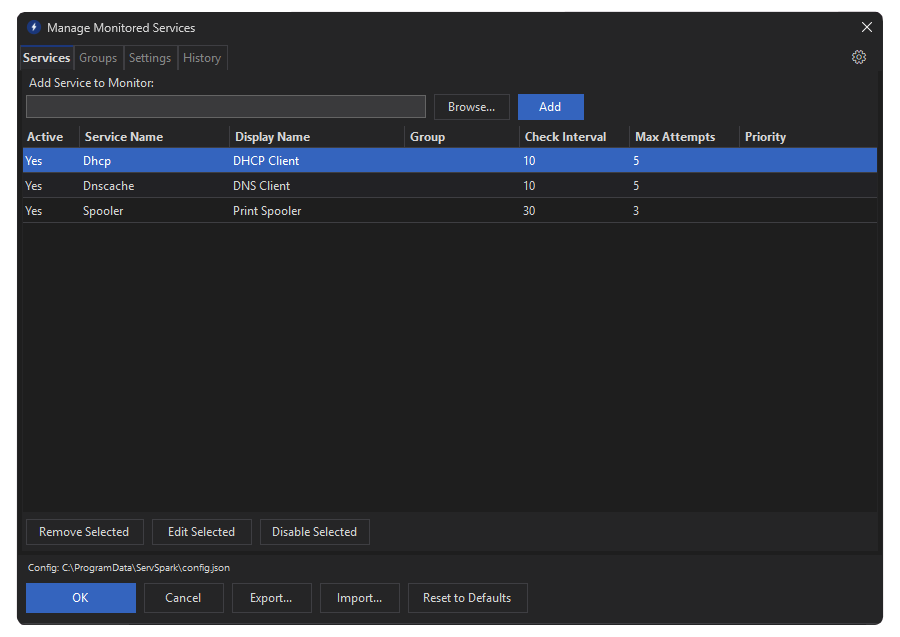
ServSpark dark mode interface showing monitored Windows services

The Problem

Windows services fail silently. Most admins find out too late.

You Find Out When Users Complain

Windows services crash quietly. No popup, no system alert. The server looks fine from the outside until someone notices something is broken.

  • Services stop with no visible warning
  • Downtime can go unnoticed for hours
  • One failed service can take down several others that depend on it

Every Fix Is the Same Stressful Scramble

When a service goes down the drill never changes — and it always pulls you away from whatever you were doing.

  1. Get a complaint. Start investigating.
  2. Remote into the server.
  3. Hunt through services.msc for the culprit.
  4. Restart it and hope it sticks.
  5. Document it. Wonder when it'll happen again.

ServSpark Monitor Fixes It Before You Hear About It

ServSpark Monitor watches the services you pick, restarts them the moment they fail, and sends you a notification confirming it's already handled.

  • Constant monitoring, zero manual effort
  • Automatic restart with configurable retry logic
  • Instant alerts via Email, SMS, Slack, Teams, Discord, and Webhook
  • Runs quietly in the background on any Windows machine

How It Works

A tray app, a Worker service, and a Watchdog — all working together to keep your services running.

System Tray App

Configure monitored services and check live status from the Windows taskbar — your control center.

Worker Service

Runs in the background alongside the tray app — monitors your services and handles automatic restarts.

Watchdog Service

Guards the Worker and tray app — restarts them automatically if they ever stop, so protection never lapses.

Always On

Up and running in minutes.

01

Pick Your Services

Open ServSpark and choose the Windows services that need to stay running — SQL Server, IIS, custom apps, or anything else critical to your environment.

02

Set Your Alerts

Paste in a webhook URL for Slack, Teams, or Discord. Add email or Twilio SMS. Set how many times ServSpark should retry before giving up on a stubborn service.

03

Let ServSpark Monitor Run

That's it. ServSpark Monitor watches your services around the clock. If something crashes, it fixes it and notifies you. You don't have to do a thing.

Real-Time Alerts

Get notified the way your team already works.

ServSpark routes status updates to wherever you already pay attention — the moment something changes.

Email

Send immediate alerts to shared inboxes, on-call aliases, or ticket-ingest mailboxes.

Best for: documented audit trails and broad visibility.

SMS (Twilio)

Push urgent service outage alerts straight to technician phones for fast reaction.

Best for: after-hours incidents and critical service failures.

Webhook

Post structured alert payloads into external workflows, automations, or internal systems.

Best for: custom routing and process automation.

Slack

Send alerts to team channels so service status appears where conversations already happen.

Delivered through webhook integration.

Teams

Post service alerts into support channels to keep incidents visible to the whole team.

Delivered through webhook integration.

Discord

Route alerts to Discord channels for internal ops teams or lab/test server environments.

Delivered through webhook integration.

See It In Action

Watch ServSpark catch and fix a service crash in real time.

The full cycle — crash, detect, restart, alert — plays out in seconds.

Service stops

ServSpark Monitor detects the failure within seconds of it happening

Automatic restart

ServSpark Monitor attempts a restart using your configured retry limit

Alert delivered

You receive a notification with the service name, status, and restart result

Simple Pricing

One price.
No subscriptions.
No surprises.

$ 129.99 one-time

One-time payment. Deploy on up to 3 devices. Includes 1 year of free updates.

Get My ServSpark Monitor License

No monthly fees. No subscriptions. Payment securely processed by Gumroad.

What's included

  • License for up to 3 devices
  • Monitor unlimited Windows services
  • Automatic restart on failure
  • Configurable retry logic per service
  • Email, SMS (Twilio), Slack, Teams, Discord & Webhook alerts
  • 1 year of free updates and hotfixes

Questions or Support

Need help with setup or troubleshooting?

If you run into issues during install, configuration, or day-to-day use, send us a message and we will help you get ServSpark Monitor working smoothly.

Direct support: support@servspark.app